
Implementing Optional Update Functionality in ASP.NET Core Web API
Example Project
The executable example for this article: CloudyWing/OptionalPatchApi.
The example differs from the time this article was written and has been rewritten using .NET 10: The OpenAPI documentation now uses the built-in generator's transformer (instead of the Swashbuckle Filter mentioned in the article), and it is presented using a PATCH endpoint and a product example. There will be discrepancies with the code in the text; it is recommended to read both in parallel.
Previously, I struggled to understand how to implement RESTful PATCH operations. Although I once tried using null to distinguish whether a field should be updated, this approach only worked for string types because, in the database, I would choose to store empty strings. Consequently, I could only update a field's value to an empty string rather than null. However, for struct types like DateTime, when the database allows null values, I encountered the issue of being unable to distinguish whether to ignore the field or store it as null.
I am not sure what the common industry practice is, but the approaches I could think of were either to have the frontend and backend agree on a specific value to represent "no update" for that field, or to add a flag field to identify whether an update is required. I personally prefer the latter.
My idea is for the backend to handle this flag, while the frontend determines whether to perform an update based on whether a specific property is passed. This way, whether it is an optional update or a required property, it does not affect the data structure.
To implement my idea, the following aspects need to be handled:
- A struct type representing an optional property.
- If the data source is
[FromBody], aJsonConverterfor this type must be written. - If the data source is
[FromForm], aModelBinderfor this type must be written. - Data Annotation validation does not target this type, so a
ValueValidatormust be written to handle it. - Because of the custom type handling, Swagger needs to be adjusted to generate the correct
swagger.json.
These will be explained separately below.
Optional Property Type
Create a struct for this type. I use a struct instead of a class here because I do not need null values. Furthermore, when no value is set, the default value of the property will be OptionalValue<T>() instead of null, which simplifies the logic required for handling.
public readonly record struct OptionalValue<T> {
    private readonly T value;

    public OptionalValue(T value) {
        HasValue = true;
        this.value = value;
    }

    public static OptionalValue<T> Empty() => new();

    [ValidateNever]
    public bool HasValue { get; }

    [ValidateNever]
    public T Value {
        get {
            if (!HasValue) {
                throw new InvalidOperationException("OptionalValue object must have a value.");
            }
            return value;
        }
    }

    public static implicit operator OptionalValue<T>(T value) {
        return new OptionalValue<T>(value);
    }

    public static explicit operator T(OptionalValue<T> value) {
        return value.Value;
    }
}An example of an Input DTO is as follows:
public class Input {
    [Required]
    public OptionalValue<string> String1 { get; set; }

    [Required]
    public OptionalValue<string?> String2 { get; set; }

    [Required]
    [Range(0, 3)]
    public OptionalValue<int> Int1 { get; set; }

    [Required]
    [Range(0, 3)]
    public OptionalValue<int?> Int2 { get; set; }
}JsonConverter for FromBody
For the JSON serialization of OptionalValue<T>, change the serialized result from:
{
  "string1": {
    "hasValue": true,
    "value": "Value"
  },
  "string2": {
    "hasValue": false,
    "value": null
  }
}To:
{
  "string1": "Value"
}Custom JsonConverter
The following is the implementation of the custom JsonConverter:
public class OptionalValueConverter<T> : JsonConverter<OptionalValue<T>> {
    public override OptionalValue<T> Read(ref Utf8JsonReader reader, Type typeToConvert, JsonSerializerOptions options) {
        if (reader.TokenType == JsonTokenType.None) {
            return OptionalValue<T>.Empty();
        } else {
            T? value = JsonSerializer.Deserialize<T>(ref reader, options);

            if (value is null && typeof(T).IsValueType && Nullable.GetUnderlyingType(typeof(T)) is null) {
                throw new JsonException($"Null value is not allowed for non-nullable type {typeof(T)}.");
            }

            return new OptionalValue<T>(value!);
        }
    }

    public override void Write(Utf8JsonWriter writer, OptionalValue<T> value, JsonSerializerOptions options) {
        if (value.HasValue) {
            JsonSerializer.Serialize(writer, value.Value, options);
        }
    }
}JsonConverterFactory
Since the custom JsonConverter is a generic type, a JsonConverterFactory is required:
public class OptionalValueJsonConverterFactory : JsonConverterFactory {
    public override bool CanConvert(Type typeToConvert) {
        return typeToConvert.IsGenericType && typeToConvert.GetGenericTypeDefinition() == typeof(OptionalValue<>);
    }

    public override JsonConverter? CreateConverter(Type typeToConvert, JsonSerializerOptions options) {
        Type type = typeToConvert.GetGenericArguments()[0];
        Type converterType = typeof(OptionalValueConverter<>).MakeGenericType(type);
        return Activator.CreateInstance(converterType) as JsonConverter;
    }
}Registering JsonConverterFactory
Add the registration of OptionalValueJsonConverterFactory in Program.cs:
builder.Services.AddControllers()
    .AddJsonOptions(opts => {
        opts.JsonSerializerOptions.Converters.Add(new OptionalValueJsonConverterFactory());
});ModelBinder for FromForm
For the data binding of OptionalValue<T>, simplify the received format from:
string1.hasValue=true
string1.value=Value
string2.hasValue=false
string2.value=To:
string1=ValueCustom ModelBinder
The following is the implementation of OptionalValueModelBinder:
public class OptionalValueModelBinder<T> : IModelBinder {
    public Task BindModelAsync(ModelBindingContext bindingContext) {
        ValueProviderResult valueProviderResult = bindingContext.ValueProvider.GetValue(bindingContext.ModelName);

        if (valueProviderResult == ValueProviderResult.None) {
            bindingContext.Result = ModelBindingResult.Success(OptionalValue<T>.Empty());
            return Task.CompletedTask;
        }

        string? valueStr = valueProviderResult.FirstValue;
        Type targetType = Nullable.GetUnderlyingType(typeof(T)) ?? typeof(T);
        bool isNullable = targetType == typeof(T);

        try {
            // Theoretically, FromForm does not need to handle null, but let's handle it anyway
            if (string.IsNullOrEmpty(valueStr)) {
                if (isNullable || (!targetType.IsValueType && valueStr is null)) {
                    bindingContext.Result = ModelBindingResult.Success(new OptionalValue<T?>(default));
                    return Task.CompletedTask;
                }

                if (targetType.IsValueType) {
                    bindingContext.ModelState.AddModelError(bindingContext.ModelName, $"The value '{valueStr}' is invalid.");
                    return Task.CompletedTask;
                }
            }

            TypeConverter converter = TypeDescriptor.GetConverter(targetType);
            object? convertedValue = null;

            if (converter.CanConvertFrom(typeof(string))) {
                convertedValue = converter.ConvertFrom(valueStr!);
            } else {
                convertedValue = Convert.ChangeType(valueStr, targetType);
            }

            bindingContext.Result = ModelBindingResult.Success(new OptionalValue<T>((T)convertedValue!));
        } catch {
            bindingContext.ModelState.AddModelError(bindingContext.ModelName, $"The value '{valueStr}' is invalid.");
        }

        return Task.CompletedTask;
    }
}ModelBinderProvider
To bind the OptionalValue<T> type with the corresponding ModelBinder, I implemented OptionalValueModelBinderProvider:
public class OptionalValueModelBinderProvider : IModelBinderProvider {
    public IModelBinder? GetBinder(ModelBinderProviderContext context) {
        Type modelType = context.Metadata.ModelType;

        if (modelType.IsGenericType && modelType.GetGenericTypeDefinition() == typeof(OptionalValue<>)) {
            Type valueType = modelType.GetGenericArguments()[0];
            Type binderType = typeof(OptionalValueModelBinder<>).MakeGenericType(valueType);

            return Activator.CreateInstance(binderType) as IModelBinder;
        }

        return null;
    }
}Registering ModelBinderProvider
Register OptionalValueModelBinderProvider in Program.cs so that ASP.NET Core can correctly use this binder when processing requests from forms:
builder.Services.AddControllers(options => {
    options.ModelBinderProviders.Insert(0, new OptionalValueModelBinderProvider());
});Handling Data Validation
To allow ValidationAttribute set on OptionalValue<T> to use the Value property for validation, we need to customize a validator that implements IModelValidator. The logic for this validator is as follows:
- When the
HasValueproperty isfalse, validation is ignored. - When
HasValueistrue, theValueproperty is used for corresponding validation.
Custom OptionalValueValidator
The following is an implementation example of OptionalValueValidator<T>:
public class OptionalValueValidator<T> : IModelValidator {
    private readonly ValidatorItem validatorItem;

    public OptionalValueValidator(ValidatorItem validatorItem) => this.validatorItem = validatorItem ?? throw new ArgumentNullException(nameof(validatorItem));

    public IEnumerable<ModelValidationResult> Validate(ModelValidationContext context) {
        if (context.Model is OptionalValue<T> optionalValue) {
            if (optionalValue.HasValue) {
                List<ModelValidationResult> results = [];
                if (validatorItem.ValidatorMetadata is IModelValidator modelValidator) {
                    results.AddRange(modelValidator.Validate(context));
                } else if (validatorItem.ValidatorMetadata is ValidationAttribute attribute) {
                    ValidationContext validationContext = new(context.Model) {
                        DisplayName = context.ModelMetadata.GetDisplayName(),
                        MemberName = context.ModelMetadata.PropertyName
                    };

                    if (!attribute.IsValid(optionalValue.Value)) {
                        results.Add(new ModelValidationResult("", attribute.FormatErrorMessage(validationContext.DisplayName)));
                    }
                }

                foreach (ModelValidationResult validationResult in results) {
                    yield return new ModelValidationResult(validationResult.MemberName, validationResult.Message);
                }
            }

        }
    }
}OptionalValueModelValidatorProvider
The following is the implementation of OptionalValueModelValidatorProvider, which is responsible for creating validators for the OptionalValue<T> type:
public class OptionalValueModelValidatorProvider : IModelValidatorProvider {
    public void CreateValidators(ModelValidatorProviderContext context) {
        bool isOptionalValueType = context.ModelMetadata.ModelType.IsGenericType
            && context.ModelMetadata.ModelType.GetGenericTypeDefinition() == typeof(OptionalValue<>);

        for (int i = 0; i < context.Results.Count; i++) {
            ValidatorItem validatorItem = context.Results[i];

            if (isOptionalValueType) {
                Type valueType = context.ModelMetadata.ModelType.GetGenericArguments()[0];
                Type validatorType = typeof(OptionalValueValidator<>).MakeGenericType(valueType);

                validatorItem.Validator = Activator.CreateInstance(validatorType, validatorItem) as IModelValidator;
                validatorItem.IsReusable = true;
            }
        }
    }
}Registering OptionalValueModelValidatorProvider
Finally, register OptionalValueModelValidatorProvider in Program.cs so that the validator can be used by the ASP.NET Core application:
builder.Services.AddControllers(opts => {
    opts.ModelValidatorProviders.Insert(0, new OptionalValueModelValidatorProvider());
})Handling Swagger Schema
Because of the custom JsonConverter and ModelBinder, to correctly display the adjusted results in the Swagger documentation, two filters need to be implemented: OptionalValueSchemaFilter and OptionalValueOperationFilter. These filters are responsible for modifying the type and parameters of the generated swagger.json to conform to the OptionalValue design.
OptionalValueSchemaFilter
OptionalValueSchemaFilter is mainly used to adjust the display of the OptionalValue<T> type in the Swagger Schema for [FromBody] scenarios, showing only its Value property. The following is an implementation example:
public class OptionalValueSchemaFilter : ISchemaFilter {
    public void Apply(OpenApiSchema schema, SchemaFilterContext context) {
        if (context.Type.IsGenericType && context.Type.GetGenericTypeDefinition() == typeof(OptionalValue<>)) {
            schema.Type = schema.Properties["value"].Type;
            schema.Properties.Clear();
        }
    }
}OptionalValueOperationFilter
OptionalValueOperationFilter is used to adjust parameters for [FromForm] requests. The following is an implementation example of this class:
public class OptionalValueOperationFilter : IOperationFilter {
    public void Apply(OpenApiOperation operation, OperationFilterContext context) {
        IList<ApiParameterDescription> parameters = context.ApiDescription.ParameterDescriptions;

        if (operation.RequestBody.Content.TryGetValue("multipart/form-data", out OpenApiMediaType? mediaType)) {
            IDictionary<string, OpenApiSchema> properties = mediaType.Schema.Properties;
            IDictionary<string, OpenApiEncoding> encoding = mediaType.Encoding;

            foreach (ApiParameterDescription parameter in parameters) {
                if (parameter.Source == BindingSource.Form
                    && parameter.ModelMetadata.ContainerType?.IsGenericType == true
                    && parameter.ModelMetadata.ContainerType.GetGenericTypeDefinition() == typeof(OptionalValue<>)
                ) {
                    if (parameter.Name.EndsWith(".HasValue")) {
                        string keyToRemove = parameter.Name;

                        if (properties.ContainsKey(keyToRemove)) {
                            properties.Remove(keyToRemove);
                        }

                        if (encoding.ContainsKey(keyToRemove)) {
                            encoding.Remove(keyToRemove);
                        }
                    }

                    if (parameter.Name.EndsWith(".Value")) {
                        string keyToModify = parameter.Name;
                        string newKey = keyToModify.Replace(".Value", "");

                        if (properties.TryGetValue(keyToModify, out OpenApiSchema? schema)) {
                            properties.Remove(keyToModify);
                            properties.Add(newKey, schema);

                            RequiredAttribute? requiredAttribute = parameter.ParameterDescriptor.ParameterType
                                .GetProperty(newKey)?
                                .GetCustomAttributes<RequiredAttribute>(false)
                                .FirstOrDefault();

                            if (requiredAttribute != null && !schema.Required.Contains(newKey)) {
                                // Added this line, Swagger will show it as required, but then it cannot handle the scenario where no value is filled
                                //mediaType.Schema.Required.Add(newKey);
                            }
                        }

                        if (encoding.TryGetValue(keyToModify, out OpenApiEncoding? apiEncoding)) {
                            encoding.Remove(keyToModify);
                            encoding.Add(newKey, apiEncoding);
                        }
                    }
                }
            }
        }
    }
}TIP
I wrote the handling for [FromBody] in OptionalValueSchemaFilter, but after adjusting OptionalValueOperationFilter, it might also support [FromBody] handling.
Registering Swagger Filter
Register these two filters into the Swagger service to ensure they take effect when generating swagger.json:
builder.Services.AddSwaggerGen(opts => {
    opts.SchemaFilter<OptionalValueSchemaFilter>();
    opts.OperationFilter<OptionalValueOperationFilter>();
});The relevant content of the generated swagger.json is as follows:
{
  "paths": {
    "/Test/Test1": {
      "post": {
        "tags": [
          "Test"
        ],
        "requestBody": {
          "content": {
            "application/json": {
              "schema": {
                "$ref": "#/components/schemas/Input"
              }
            },
            "text/json": {
              "schema": {
                "$ref": "#/components/schemas/Input"
              }
            },
            "application/*+json": {
              "schema": {
                "$ref": "#/components/schemas/Input"
              }
            }
          }
        },
        "responses": {
          "200": {
            "description": "Success"
          }
        }
      }
    },
    "/Test/Test2": {
      "post": {
        "tags": [
          "Test"
        ],
        "requestBody": {
          "content": {
            "multipart/form-data": {
              "schema": {
                "type": "object",
                "properties": {
                  "String1": {
                    "type": "string"
                  },
                  "String2": {
                    "type": "string"
                  },
                  "Int1": {
                    "type": "integer",
                    "format": "int32"
                  },
                  "Int2": {
                    "type": "integer",
                    "format": "int32"
                  }
                }
              },
              "encoding": {
                "String1": {
                  "style": "form"
                },
                "String2": {
                  "style": "form"
                },
                "Int1": {
                  "style": "form"
                },
                "Int2": {
                  "style": "form"
                }
              }
            }
          }
        },
        "responses": {
          "200": {
            "description": "Success"
          }
        }
      }
    }
  },
  "components": {
    "schemas": {
      "Input": {
        "required": [
          "int1",
          "int2",
          "string1",
          "string2"
        ],
        "type": "object",
        "properties": {
          "string1": {
            "$ref": "#/components/schemas/StringOptionalValue"
          },
          "string2": {
            "$ref": "#/components/schemas/StringOptionalValue"
          },
          "int1": {
            "$ref": "#/components/schemas/Int32OptionalValue"
          },
          "int2": {
            "$ref": "#/components/schemas/Int32NullableOptionalValue"
          }
        },
        "additionalProperties": false
      },
      "Int32NullableOptionalValue": {
        "type": "integer",
        "additionalProperties": false
      },
      "Int32OptionalValue": {
        "type": "integer",
        "additionalProperties": false
      },
      "StringOptionalValue": {
        "type": "string",
        "additionalProperties": false
      }
    }
  }
}Execution Results
Use the following code for testing:
[ApiController]
[Route("[controller]/[action]")]
public class TestController : ControllerBase {
    private readonly ILogger<TestController> _logger;

    public TestController(ILogger<TestController> logger) {
        _logger = logger;
    }

    [HttpPost]
    public void Test1([FromBody] Input forecast) {

    }

    [HttpPost]
    public void Test2([FromForm] Input forecast) {

    }

    [HttpPost]
    public void Test3([FromForm] Input2 forecast) {

    }
}FromBody Results
If no properties are passed.
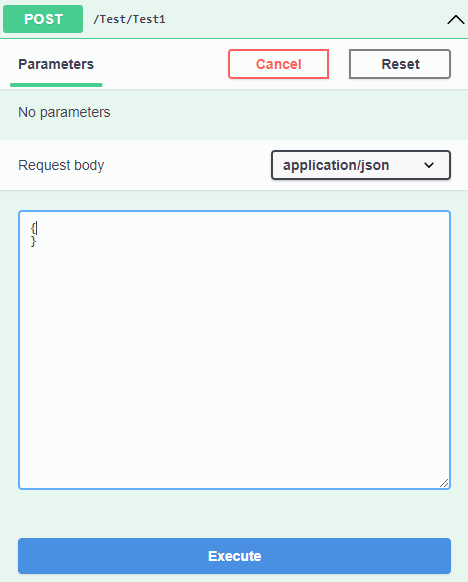
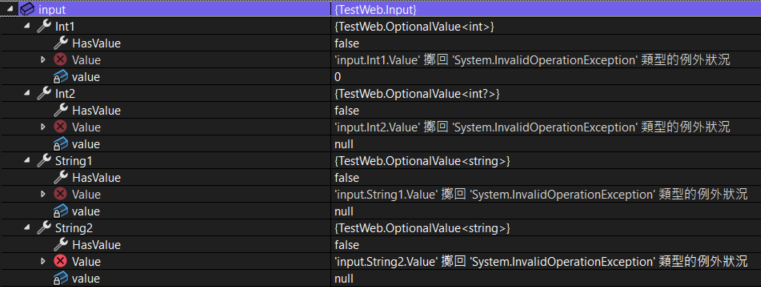
Validation passes, but the result will be OptionalValue<T>.Empty.
If a property is passed, but the value is invalid.
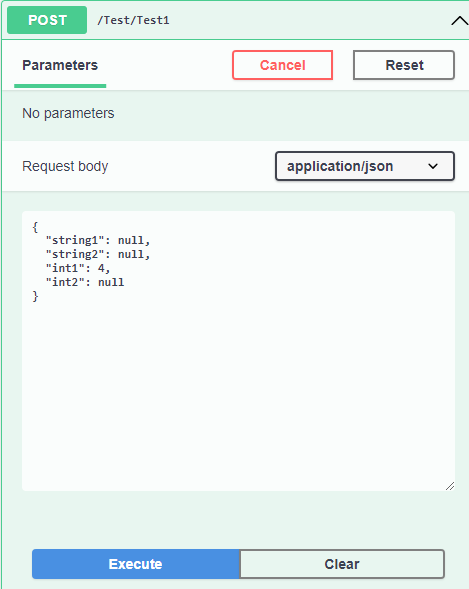
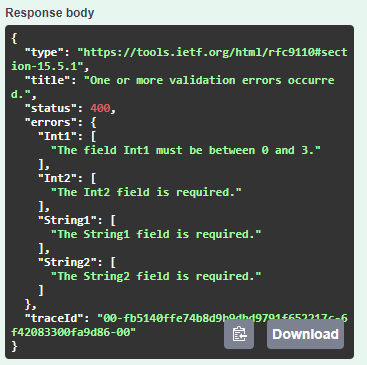
Validation will be performed.
If a valid value is passed.
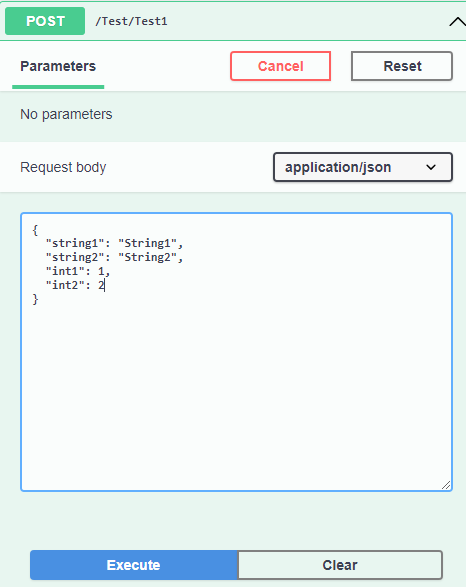
An OptionalValue<T> with a value can be obtained.
FromForm Results
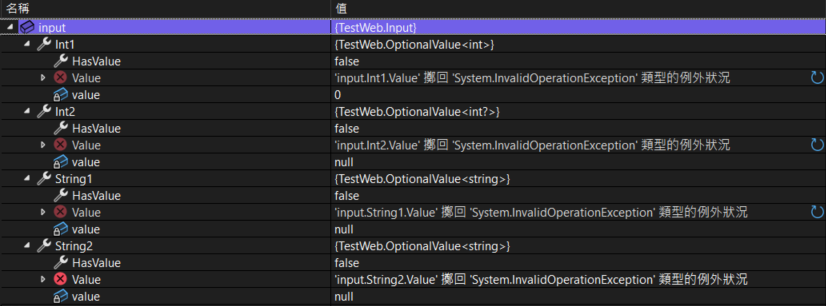
If no value is entered.
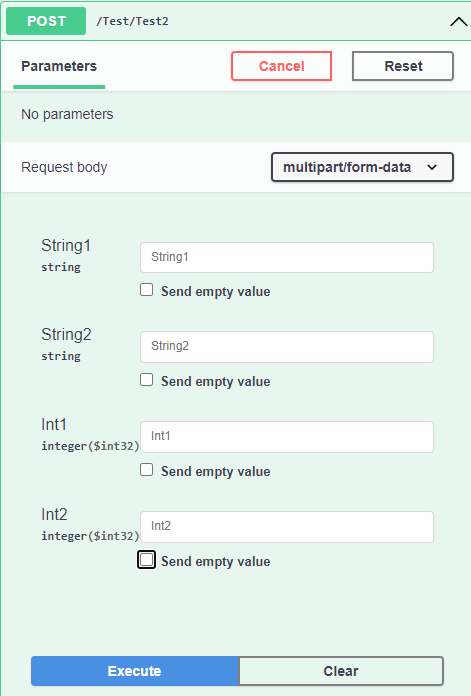
Validation passes, but the result will be OptionalValue<T>.Empty.
If an empty or invalid value is entered.
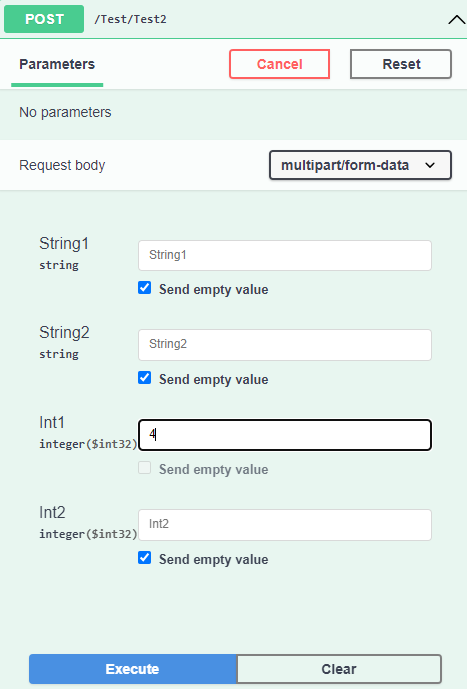
Validation will be performed.
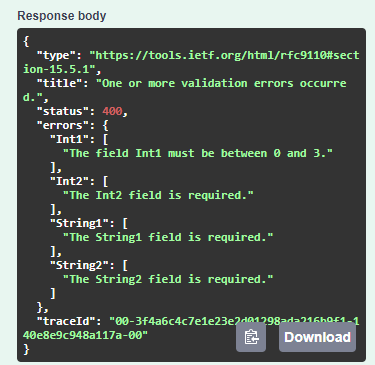
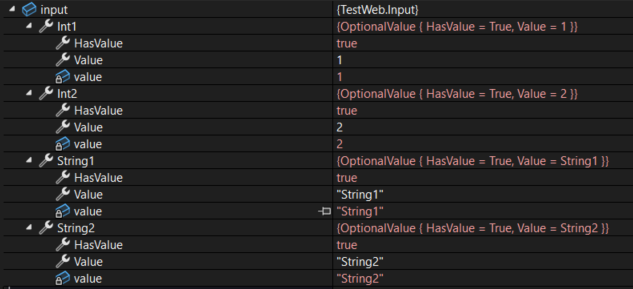
If a valid value is passed.
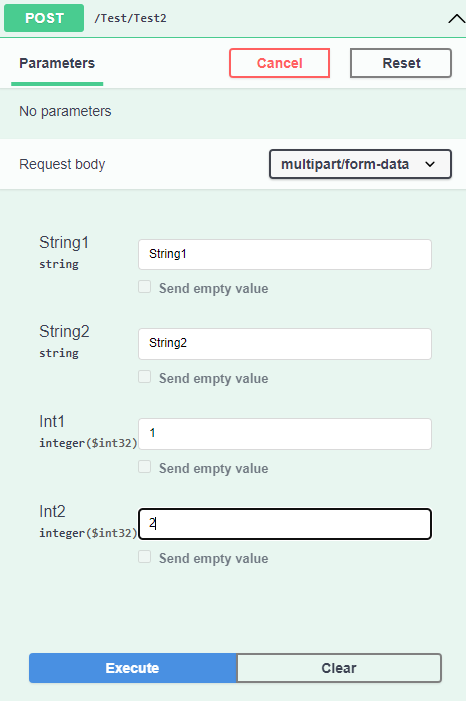
An OptionalValue<T> with a value can be obtained.
Change Log
- 2024-10-21 Initial document creation.
- 2026-05-17 Added GitHub example project link.